

Description#
The IMF is hit by a cyber attack compromising sensitive data. Luther sends Ethan to retrieve crucial information from a compromised server. Despite warnings, Ethan downloads the intel, which later becomes unreadable. To recover it, he creates a forensic image and asks Benji for help in decoding the files.
Check the challenge here.
References#
Solution#
The challenge archive contains ethanPC.ad1. AD1 is AccessData’s forensic image format. It is a logical image, so it contains selected files and folders from the original system rather than a complete physical disk image. FTK Imager can open it and preserve the directory structure and file metadata while we examine the evidence.
Q1: What is the MD5 hash of the potentially malicious EXE file the user downloaded?
I opened the image in FTK Imager, navigated to the user’s Downloads folder, and found IMF-Info.pdf.exe. I right-clicked the file and selected Export File Hash List.
Flag: 336a7cf476ebc7548c93507339196abb
Q2: What is the URL from which the file was downloaded?
Windows stores download information in an alternate data stream called Zone.Identifier. In FTK Imager, I expanded the executable in the evidence tree and opened its Zone.Identifier stream. The HostUrl entry contains the URL used to download the file.
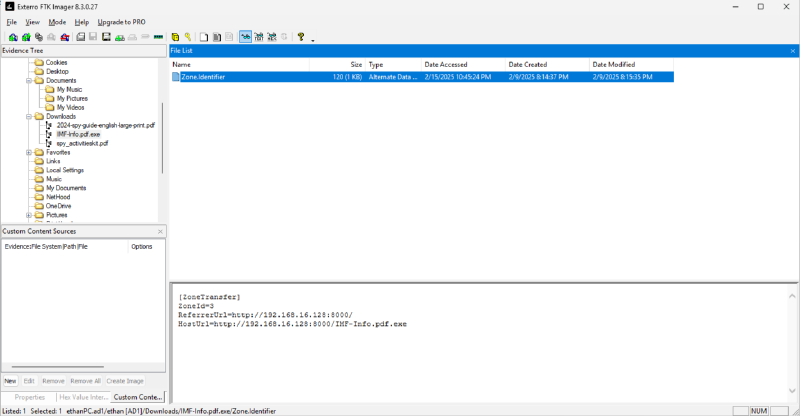
Flag: http://192.168.16.128:8000/IMF-Info.pdf.exe
Q3: What application did the user use to download this file?
While exploring AppData, I found data for both Chrome and Edge. Browser history is stored in a SQLite database named History, usually under User Data\Default\History. I opened the databases with SQLite Viewer Web App and checked the download records. The matching record was in Edge’s database, which identifies the application used to download the executable.
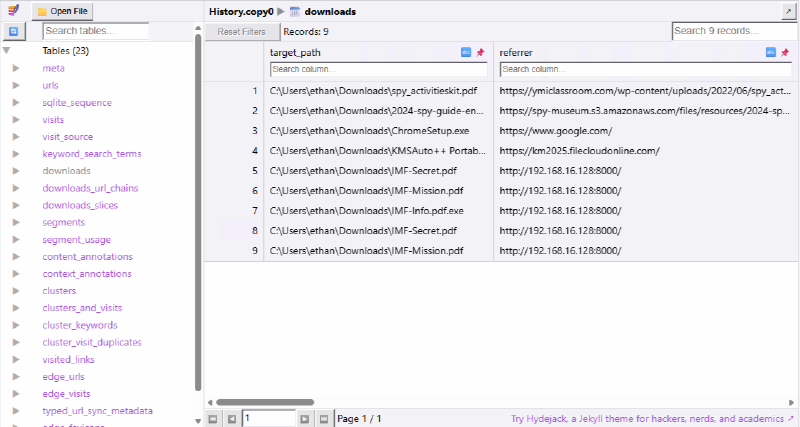
Flag: Microsoft Edge
Q4: By examining Windows Mail artifacts, we found an email address mentioning three IP addresses of servers that are at risk or compromised. What are the IP addresses?
Following the reference above, I found the Windows Mail database at AppData\Local\Packages\microsoft.windowscommunicationsapps_8wekyb3d8bbwe\LocalState\HxStore.hxd. The file contains serialized mail records. The @body marker identifies the beginning of an email body, so it is a useful anchor when searching the raw file.
I extracted printable strings and displayed the lines following each @body marker:
strings -a -n 5 HxStore.hxd | grep -A 200 '@body'The relevant part of the output contains the three server addresses:
<SNIP>
Pve id
VseverU
	bpromis
. You ca
	@nito
status thr
c hubs:o
0PraQ
PClusth
IP: 145.67.29.88 (at risk
?on)Z
London O
	B Hub
212.33.10.112 (partial breach detected
Berlin Vault
192.168.16.128
@progG
Please <b>DO NOT download or execute any
Flag: 145.67.29.88, 212.33.10.112, 192.168.16.128
Q5: By examining the malicious executable, we found that it uses an obfuscated PowerShell script to decrypt specific files. What predefined password does the script use for encryption?
I extracted the printable strings from the executable and searched them for powershell in VSCode:
strings -a -n 5 IMF-Info.pdf.exe > strings.txt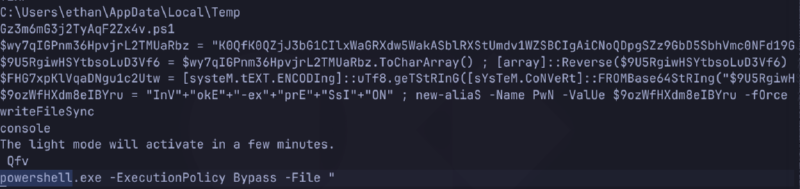
The script contains three obfuscated strings. The value assigned to $FHG7xpKlVqaDNgu1c2Utw is the reversed Base64 representation of the value assigned to $wy7qIGPnm36HpvjrL2TMUaRbz. Reversing the string first and then decoding it from Base64 reveals the predefined password.
I used CyberChef with the Reverse operation followed by From Base64 to decode it.
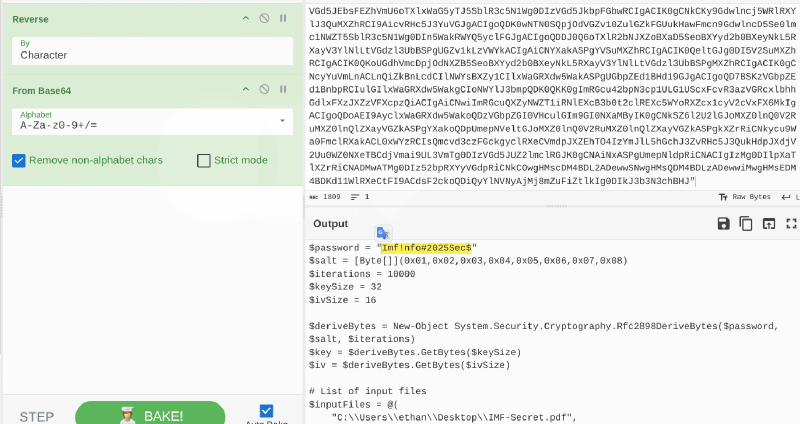
Flag: Imf!nfo#2025Sec$
Q6: After identifying how the script works, decrypt the files and submit the secret string.
After decoding the script, I adapted it to decrypt both .enc files:
$password = "Imf!nfo#2025Sec$"
$salt = [Byte[]](0x01,0x02,0x03,0x04,0x05,0x06,0x07,0x08)
$iterations = 10000
$keySize = 32
$ivSize = 16

$deriveBytes = New-Object System.Security.Cryptography.Rfc2898DeriveBytes($password, $salt, $iterations)
$key = $deriveBytes.GetBytes($keySize)
$iv = $deriveBytes.GetBytes($ivSize)

$inputFiles = @(
    "C:\Users\docker\Desktop\CTF\silent_breach\IMF-Mission.enc",
    "C:\Users\docker\Desktop\CTF\silent_breach\IMF-Secret.enc"
)

foreach ($inputFile in $inputFiles) {
    $outputFile = $inputFile -replace '\.enc$', '.pdf'

    $aes = [System.Security.Cryptography.Aes]::Create()
    $aes.Key = $key
    $aes.IV = $iv
    $aes.Mode = [System.Security.Cryptography.CipherMode]::CBC
    $aes.Padding = [System.Security.Cryptography.PaddingMode]::PKCS7

    $decryptor = $aes.CreateDecryptor()

    $encBytes = [System.IO.File]::ReadAllBytes($inputFile)

    $outStream = New-Object System.IO.FileStream($outputFile, [System.IO.FileMode]::Create)
    $cryptoStream = New-Object System.Security.Cryptography.CryptoStream($outStream, $decryptor, [System.Security.Cryptography.CryptoStreamMode]::Write)

    $cryptoStream.Write($encBytes, 0, $encBytes.Length)
    $cryptoStream.FlushFinalBlock()

    $cryptoStream.Close()
    $outStream.Close()

    Remove-Item $inputFile -Force
}
The script derives a 32-byte AES key and a 16-byte IV from the password and salt using PBKDF2 with 10,000 iterations. It then decrypts the files with AES-CBC and PKCS7 padding, writing the results as PDFs. The flag is in IMF-Mission.pdf.
Flag: CyberDefenders{N3v3r_eX3cuTe_F!l3$_dOwnL0ded_fr0m_M@lic10u5_$erV3r}
I used AI to check spelling and enhance phrasing of this writeup. I also used it to get information about browser History file location.