

Description#
TechNova Systems’ SOC has detected suspicious outbound traffic from a public-facing IIS server in its cloud platform—activity suggestive of a web-shell drop and covert connections to an unknown host.
As the forensic examiner, you have three critical artefacts in hand: a PCAP capturing the initial traffic, a full memory image of the server, and a malware sample recovered from disk. Reconstruct the intrusion and all of the attacker’s activities so TechNova can contain the breach and strengthen its defenses.
Check the challenge here.
Solution#
We have three files in this scenario: capture.pcapng, memdump.mem, and updatenow.exe, each dedicated to one section of the challenge.
The first section is all about the network analysis of the incident (capture.pcapng). I opened the file in Wireshark and took a broad look at it (just to get a feel for the packets and the overall size of the file).
Q1: After flooding the IIS host with rapid-fire probes, the attacker reveals their origin. Which IP address generated this reconnaissance traffic?
After reading the question, we have a clue that we need to look for a probing pattern, and by simply scrolling through Wireshark we can see some unusual network behavior:
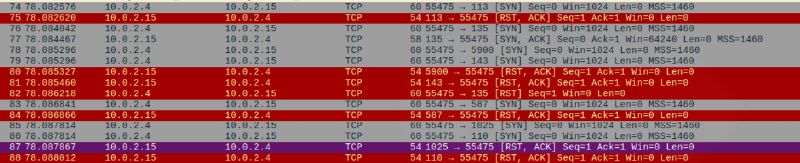
We can see that random ports are probed with TCP SYN packets so the attacker can check which ports are open. This means that the source IP of these packets is the attacker’s IP address.
Flag: 10.0.2.4
Q2: The attacker is carrying out targeted enumeration against the HTTP service on the IIS host. Based on the HTTP request headers, which tool is being used?
We can filter for http traffic in Wireshark and select Follow > HTTP Stream, which allows us to view the raw HTTP data and inspect the User-Agent header field: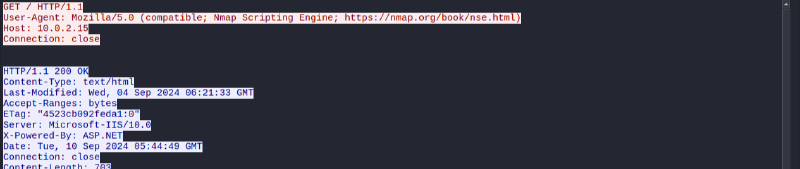
Flag: nmap
Q3: While reviewing the SMB traffic, you observe two consecutive Tree Connect requests that expose the first shares the intruder probes on the IIS host. Which two full UNC paths are accessed?
The question literally tells us to review the SMB traffic. Filter for smb2, and you will find the shares listed in the packets:
Flag: \\10.0.2.15\Documents, \\10.0.2.15\IPC$
Q4: Inside the share, the attacker plants a web-accessible payload that will grant remote code execution. What is the filename of the malicious file they uploaded?
Looking deeper into the smb2 packets, we can find the uploaded file:
Flag: shell.aspx
Q5: The newly planted shell calls back to the attacker over an uncommon but firewall-friendly port. Which listening port did the attacker use for the reverse shell?
So the attacker uploaded a web shell via SMB, and by reading the prompt and following that script, the attacker opens a reverse shell. I looked back through the HTTP traffic until I found where the web shell was requested (something like GET <web shell> HTTP/1.1). The reverse shell connection must begin after the malicious file was requested: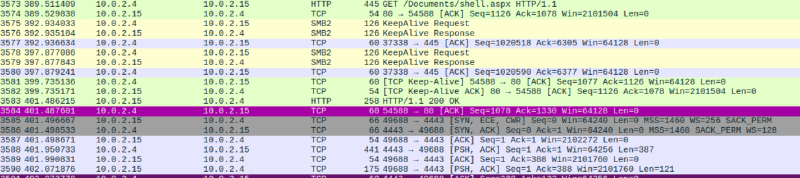
Flag: 4443
Now let’s move on to the memory analysis section.
Q6: Your memory snapshot captures the system’s kernel in situ, providing vital context for the breach. What is the kernel base address in the dump?
We can use volatility3 to analyze the memory dump. We can get the kernel base address by using the windows.info plugin: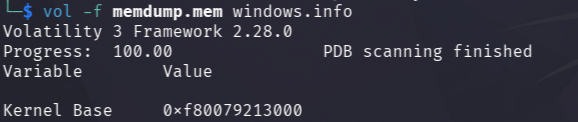
Flag: 0xf80079213000
Q7: A trusted service launches an unfamiliar executable residing outside the usual IIS stack, signaling a persistence implant. What is the final full on-disk path of that executable?
The word persistence is really important. In Windows, we can place binaries that we want to execute automatically after boot into the Startup folder, which is also a place where we can find persistent malware.
We can check whether any such binaries are present with the following command:
vol -f memdump.mem windows.pstree | grep StartupFlag: C:\ProgramData\Microsoft\Windows\Start Menu\Programs\Startup\updatenow.exe
Q8: The reverse shell’s outbound traffic is handled by a built-in Windows process that also spawns the implanted executable. What is the name of this process, and what PID does it run under?
From the output of the previous question, we could see that the parent PID of the binary is 4332; if we do the same search, we find the name of the service:
vol -f memdump.mem windows.pstree | grep 4332Flag: w3wp.exe, 4332
Q9: Static inspection reveals the binary has been packed to hinder analysis. Which packer was used to obfuscate it?
I opened the binary in ghidra and found this unusual layout:
After asking an LLM, I found what UPX is:
UPX = Ultimate Packer for eXecutables (UPX) is an open-source, cross-platform executable packer designed to compress binaries. It compresses the binary sections (.text, .data, …) into UPX0, UPX1, …
Flag: upx
Q10: Threat-intel analysis shows the malware beaconing to its command-and-control host. Which fully qualified domain name (FQDN) does it contact?
I uploaded the file to VirusTotal and found a suspicious domain that the binary tries to contact: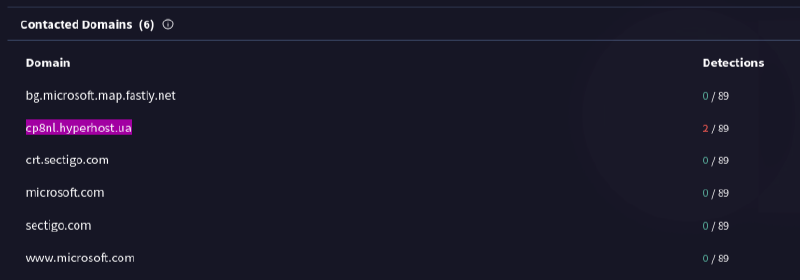
Flag: cp8nl.hyperhost.ua
Q11: Open-source intel associates that hash with a well-known commodity RAT. To which malware family does the sample belong?
Usually the Community section in VirusTotal shows OSINT and threat intelligence information about a malicious file, and that is where I found my answer.
Flag: AgentTesla
I used AI to check spelling and enhance phrasing of this writeup. I also used it for Volatility commands and UPX knowledge.